1
Share it.
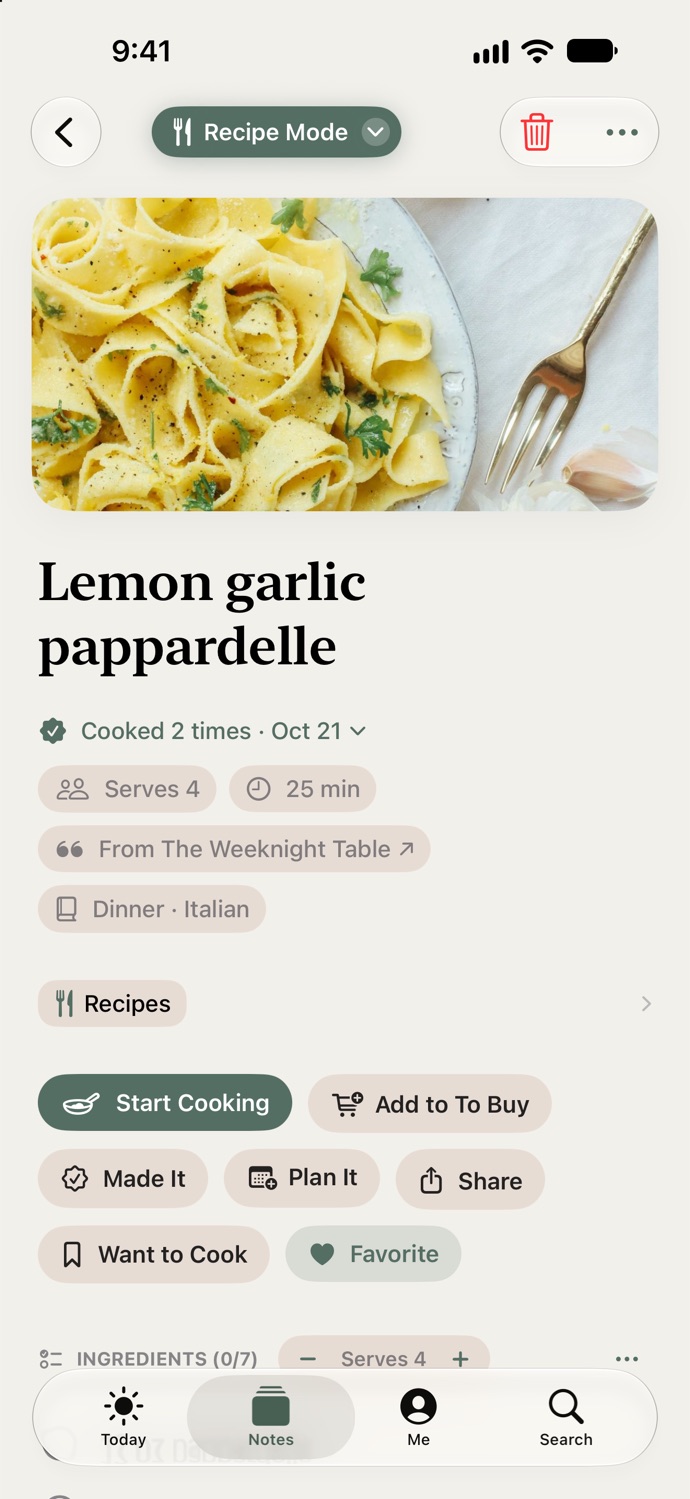
On Instagram, TikTok, YouTube or in Safari, tap Share and choose Active Notes. That is the whole job. A moment later a notification says it’s filed: Serves 4, 35 minutes, filed under Dinner, the creator credited.
You’ve saved three hundred recipes. You’ve cooked four. The one you wanted tonight is behind a dress, two dog videos and a sourdough tutorial, and it is 5:30. Share the next one to Active Notes instead. It arrives as a recipe, not a screenshot, and at 5:30 it is the answer.
See it. Share it. Safely forget it. Two taps from Instagram, TikTok, YouTube or any website, nothing typed, no account.
“My saved folder on Instagram had so many dinner videos I knew I was never going to make. Trying to pause a reel over and over while cooking is useless. Now I just share the post into the app and it turns it into an actual recipe with an ingredient list and steps. The timer right on the screen is great too. I finally cooked four meals that had been sitting in my saves for months.”
From your feed to your stove
1
On Instagram, TikTok, YouTube or in Safari, tap Share and choose Active Notes. That is the whole job. A moment later a notification says it’s filed: Serves 4, 35 minutes, filed under Dinner, the creator credited.
2
Tap Start Cooking. The screen stays on, the step you’re on stays lit with the next one readable, every “simmer 20 minutes” is a timer, and the amount is one tap away inside the step. No scrolling back with wet hands.
3
The recipe remembers: cooked 3 times, last Sunday, less salt, with a photo if you like. Next time, last time’s note is right under the steps. Your Recipes sort themselves into chapters, with a Want to Cook shelf for tonight.
One dinner, hour by hour
12:15 PM · A quiet minute on Instagram
A one-pan orzo that looks doable on a Tuesday.
Share it to Active Notes. It arrives as a recipe, not a screenshot: Serves 4, 35 minutes, the ingredients to tick, the steps as cards, filed under Dinner with the creator credited. Then you forget about it, on purpose.
Free12:20 PM · Still on the couch
Three ingredients you don’t have.
Tick the ones you do. Tap Add to To Buy and the rest join the grocery list without doubling the eggs already on it. With Premium that is the household list, on your partner’s phone right away.
Free · household list is Premium3:30 PM · The store
Both hands full, phone in a pocket.
The list is on your Apple Watch. Tick off the orzo, the lemon, the feta from your wrist. The phone stays where it is.
Free6:00 PM · The stove
Start Cooking.
The screen stays on. Step 2 is lit, step 3 is readable underneath. “Simmer 12 minutes” is a link; tap it and a timer counts down above the steps, on your Lock Screen, and on your wrist. Tap “stock” and the amount appears right there in the step. On the iPad on the counter, the ingredients sit beside the steps.
Free · iPad is Premium6:40 PM · Plates down
Tap Made It.
Cooked once, tonight. Add a photo, write “more lemon next time”, and it is under the steps when you cook it again. Send the recipe to your sister as a card or a link; she needs no app to read it.
FreeNext month · Recipes
“Still want to make this?”
A recipe saved a month ago and never cooked asks once: Want to Cook, Keep, or Let It Go. Recipes never clear themselves. This is the one place the app checks whether you still mean it.
FreeEverything the kitchen does
Nobody should pay to keep the screen on. Premium is the second phone and the iPad, below.
Larger type, the current step centred, Back and Next, “Step 2 of 4”. Full screen on iPhone; ingredients beside the steps on iPad and Mac.
Every duration in a step is a tap away from counting down, on the Lock Screen and in the Dynamic Island. On iOS 26 it rings even with the phone on silent.
Serves 4 to Serves 6 with one stepper. Real fractions, units that follow the amount, and “a pinch of salt” left exactly as written.
What you haven’t ticked goes on the grocery list, at the scale on screen, merged with what is already there. Two cups of flour plus one is three.
The list in the aisle. At the stove, the step you’re on, the timers, and Made It, from the Apple Watch, with no setup.
Breakfast, Dinner, Desserts, Drinks: chapters filled for you. Shelves for Favorites, Want to Cook and Cooked Recently. Search by what is in the fridge.
A recipe saved a month ago and never made is asked about once, then kept or let go. Recipes never clear themselves on their own.
A Story-sized or full recipe card in the app’s palette, the creator credited, or a link that renders the whole recipe with no app needed.
The whole habit
The moment
You already know the feeling: a recipe scrolls past and some part of you says “I’ll never find this again.” That feeling is the cue. Nothing else changes about your day.
The two taps
Share, Active Notes. Easier than Instagram’s own Save, because you never have to go looking for it again. Nothing to type, nothing to name, nothing to file.
What comes back
A recipe with a chapter, a shelf, and a cook log that fills as you go. No streaks, no badges, no feed. Once dinner is a reflex, the school flyer and the invite ride the same reflex: screenshot it, and it is on your calendar.
Active Notes is the app that remembers for you. Recipes are where that starts, because dinner is every day.
Premium · Family Sharing included
Your partner cooks from the screenshot you texted, and asks what the oven was on. Tap Share with Your Household on any recipe instead and it is in Our Cookbook on both phones, live: either of you adds a recipe, ticks an ingredient or taps Made It, and the other sees it. The grocery list is shared the same way. And the recipe you saved on the phone is on the iPad on the counter, because Premium keeps every device in step.
$39.99 a year, about $3.33 a month, or $4.99 monthly. Cancel anytime.
Our Cookbook
Lemon orzo with feta
Either of you adds a recipe, and it’s on the other’s phone before dinner.
Questions
Instagram, TikTok, YouTube and any website, through the share sheet: tap Share and choose Active Notes. A recipe video or post is read from its caption, with a screenshot of the recipe as backup; a web page is read from the recipe itself. A photo of a handwritten card or a cookbook page works too, with the original kept on the note.
Yes. Everything in the kitchen is free with no account: cook mode with the screen kept on, timers inside the steps, amounts inside the steps, scaling by servings, Add to To Buy, Made It and the cook log, Your Notes, a cookbook that sorts itself into chapters, search by ingredient, the Apple Watch cook page, and recipe cards and links to send anyone. Premium is the second phone and the iPad: your cookbook shared with your household, and sync so the recipe you saved on the phone is on the iPad on the counter.
The original post, page or photo stays on the note, and the creator’s post is one tap away, so you can always check. Any ingredient line is a tap to edit, and the method has an Edit button. Extraction is a draft; the recipe is yours.
Always. The recipe shows where it came from, such as “From @creator on Instagram”, and that chip opens the original post. The recipe card and the recipe link you send carry the same credit.
With Premium, tap Share with Your Household on any recipe and it goes into Our Cookbook, on both phones, live: either of you adds a recipe, ticks an ingredient or taps Made It, and the other sees it. Your partner joins by a link, free, and with Apple Family Sharing one subscription makes them Premium too. Sending a single recipe to a friend as a card or a link is free for everyone.
Download Active Notes, share the next recipe that scrolls past, and cook from it tonight. No account, no card, no setup. Screenshots land on your calendar the same way.