Skip to content
For the one who runs it all

Stop being the only one who remembers.

Screenshot or share anything: school emails, things to buy, or recipes you saved. We organize the details and sync them to your calendar and everyone’s phone automatically. No typing needed.

Free to use. No account needed.

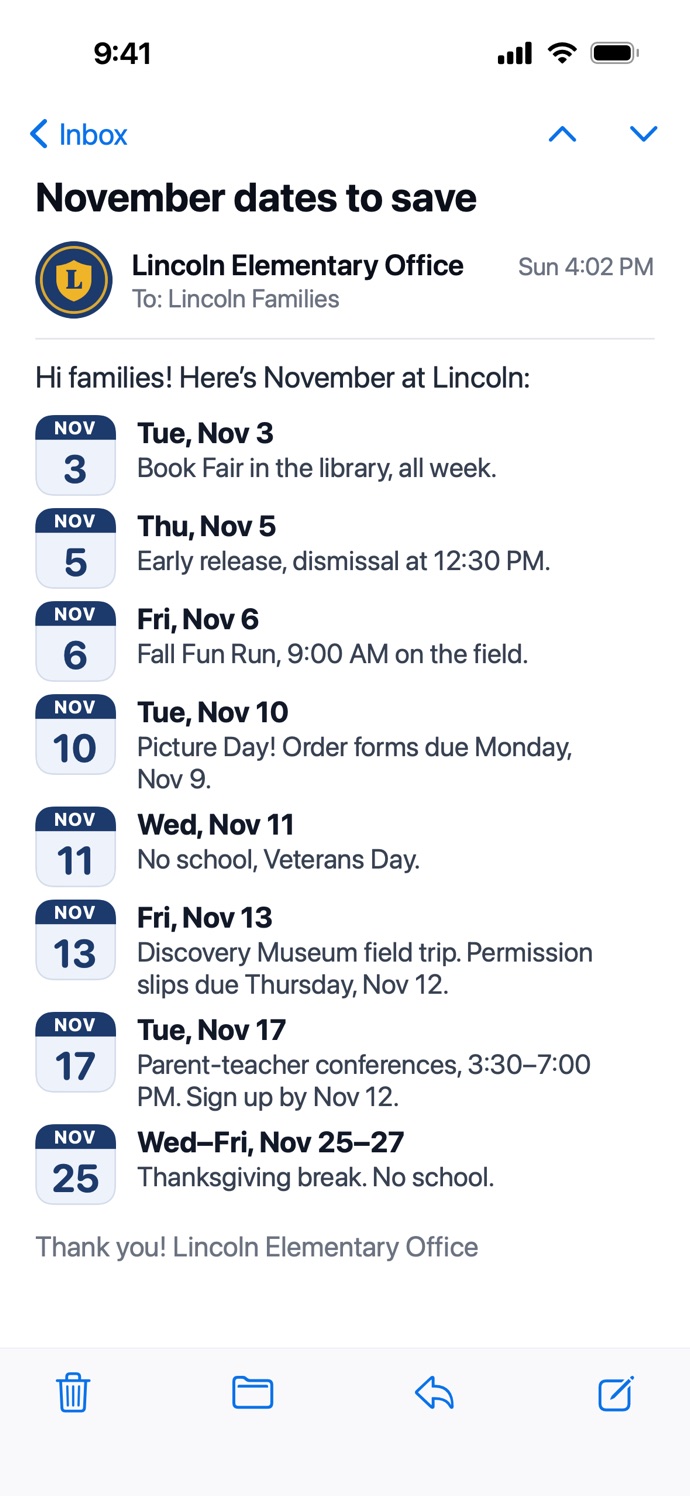
A school email listing eight November dates: the Book Fair, early release, the Fun Run, Picture Day, a day off, a field trip, conferences and Thanksgiving break
The school email
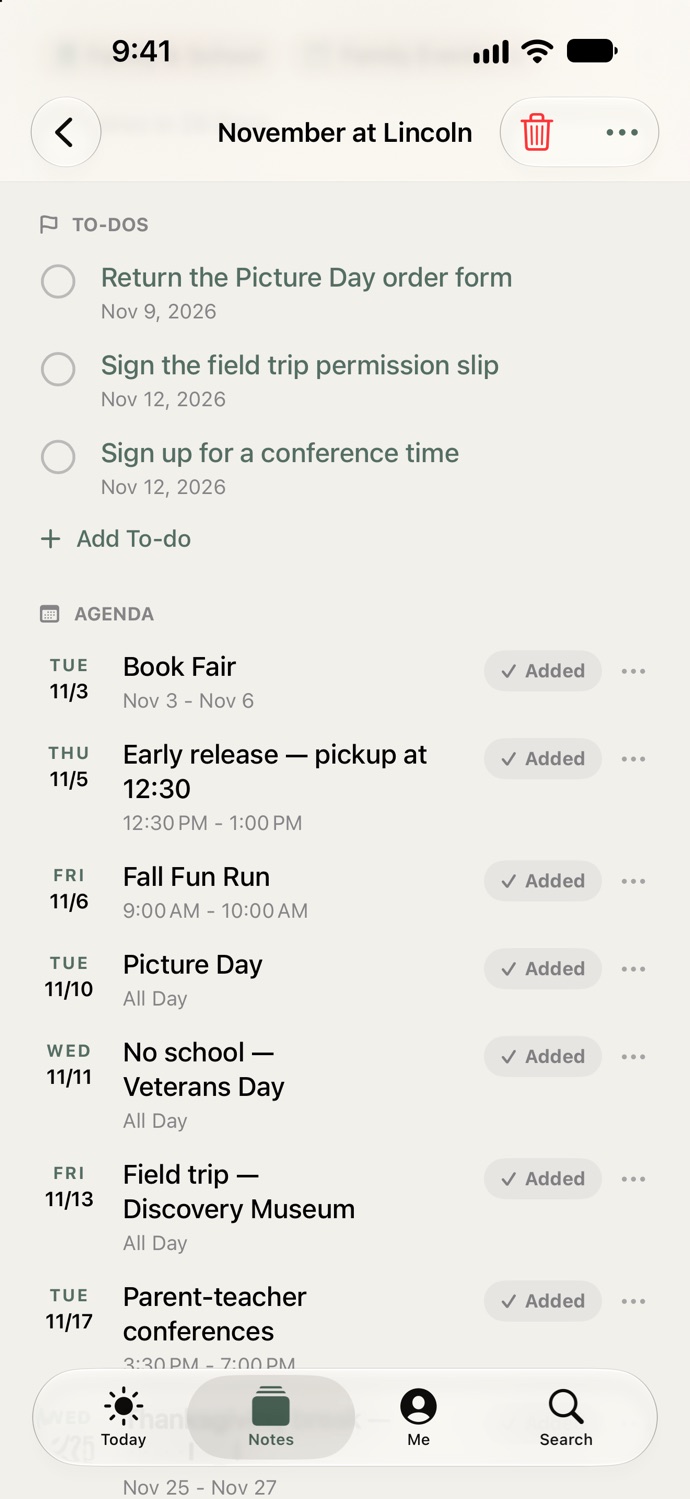
The same email in Active Notes: every date on the calendar, each marked Added
In Active Notes

One screenshot. Eight dates on your calendar, three to-dos, nothing typed.

Your calendar, not ours

Apple Calendar, or the Google Calendar your family already shares. We meet you where you are.

What’s for dinner, decided

Share a recipe from Instagram, TikTok or the web and cook from it tonight, or plan the week with one grocery list.

Your day, read to you

A morning digest so you’re ready, and an evening one that ends with “nothing needs you tonight.”

And that’s some of it

Packages tracked, lists on your wrist, iPad and Mac in sync. See every feature.

How it works

You take the screenshot. It does the rest.

1

Screenshot it.

The school email, the team schedule, the party invite. Or share a link or a photo.

2

It’s scheduled.

Every date, with a reminder before it starts. The to-dos are written for you.

3

It clears itself.

When the date has passed, the note goes. Keep the ones you want.

Recorded in the real app. 17 seconds.

Not another AI assistant

You don’t talk to it. You just screenshot.

You never ask it anything.

No chat window, no typing out what you want. It’s on the calendar before you’ve put the phone down.

It never reads your mail or spends your money.

It sees one screenshot at a time, the one you took. Your notes stay on your phone.

It does less, on purpose.

No feed, no streaks, no red badges. The evening digest ends with “nothing needs you tonight,” and means it.

Your whole household · Premium

Everyone’s schedule, on everyone’s phone.

School, soccer, piano, the dentist, Saturday’s party. Screenshot it into Family Events and it’s on every calendar at home, with a reminder.

  • Family Events on everyone’s calendar
  • Grocery and to-do lists, shared live
  • Your partner joins free
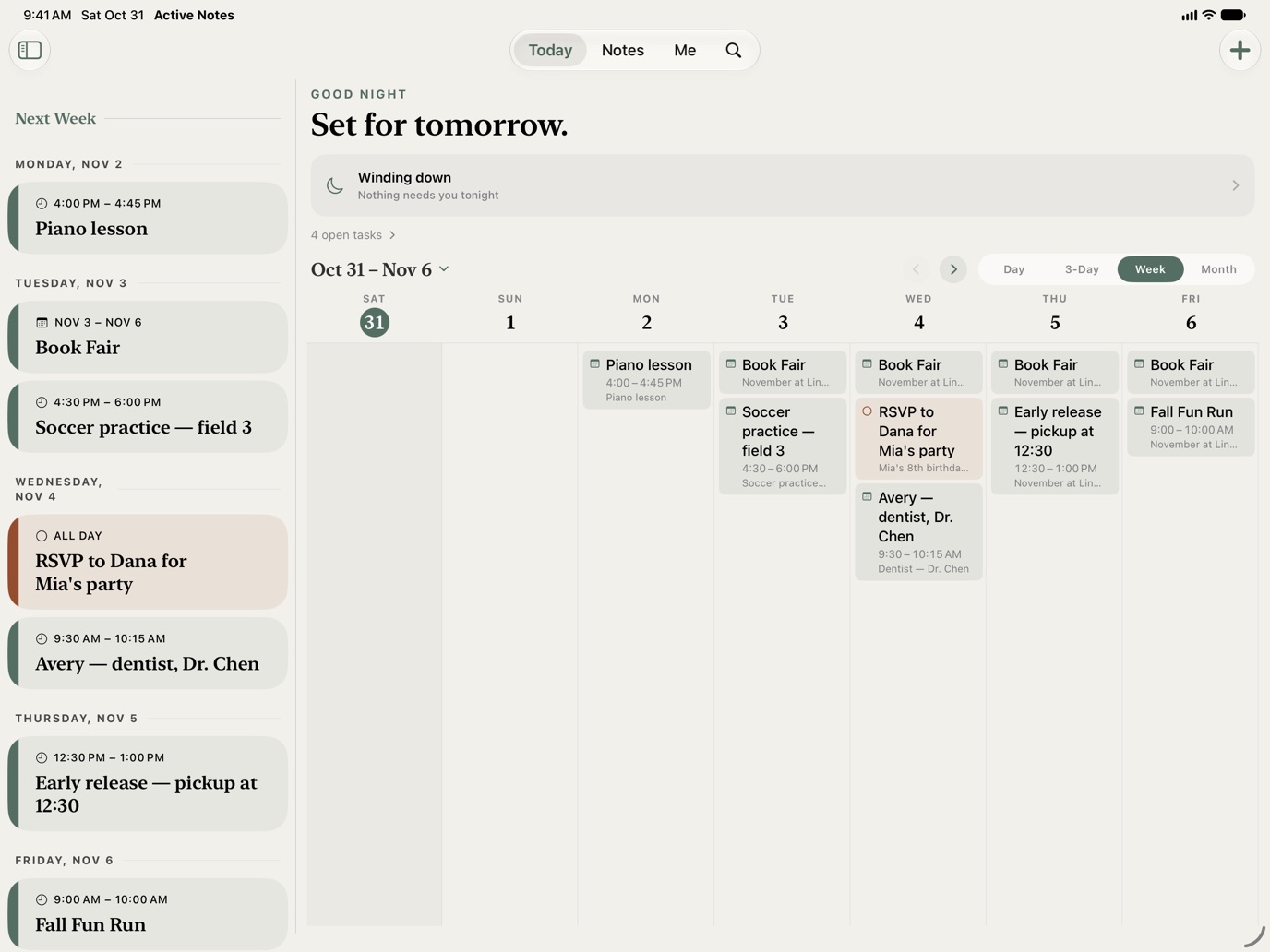
The family’s week in Active Notes on iPad: piano, the Book Fair, soccer, the dentist, early release, the Fun Run and a birthday party

Also handled

And the rest that lands on you.

The RSVP, written for you

Invites and flyers arrive with the to-do they ask for.

The thing you meant to buy

Screenshot the dress or the deal. It’s in To Buy with the price and the link, not lost in your camera roll.

Lists on your wrist

The grocery list on Apple Watch, ticked off in the aisle.

Packages, tracked

Know when it’s out for delivery and when it lands. Premium.

See every feature or read a whole Tuesday.

From the households using it

What changed at home.

“We tried a family calendar app and a shared calendar. The problem was never the calendar, it was having to type everything out. Nobody has time to sit there copying dates into an app every single morning. When school sends a long email or a schedule flyer, I just take a screenshot and drop it in. The app pulls the dates and times onto my calendar automatically. It saved me from missing three early dismissals last month.”
SophieMom of two
“Whenever my husband went to the store my phone would blow up with texts asking what we already had at home or which brand to get. I put this on his phone and set up our grocery list. He checked things off as he went, and when I added two things from home they showed up on his list before he got in line to pay. Zero back and forth texts. It just works.”
ElenaOperations manager
“My saved folder on Instagram had so many dinner videos I knew I was never going to make. Trying to pause a reel over and over while cooking is useless. Now I just share the post into the app and it turns it into an actual recipe with an ingredient list and steps. The timer right on the screen is great too. I finally cooked four meals that had been sitting in my saves for months.”
CarolAccountant

Pricing

Free handles your screenshots. Premium handles your household.

Free

No account needed to start

$0

forever · your notes stay on your device

  • ✓Screenshots read and filed
  • ✓Every date on your calendar, with a reminder
  • ✓To-dos pulled from the flyer
  • ✓A morning and evening digest
  • ✓Lists, on Apple Watch too
  • ✓Recipes ready to cook from
  • +Free account: Google Calendar
Join Waitlist Download free
7-Day Free Trial

Premium

Your whole household on the same page.

$39.99

per year, about $3.33 a month · or $4.99 monthly

  • ✓Everything in Free
  • ✓Family Events on everyone’s calendar
  • ✓Shared lists, live
  • ✓Screenshots read on their own
  • ✓Synced to iPhone, iPad and Mac
  • ✓Apple Family Sharing included
  • ✓Plus package tracking and the week’s dinners
Join Waitlist Start 7-Day Free Trial

The yearly plan begins with a 7-day free trial; the monthly plan does not include a trial. Payment is charged to your Apple ID at confirmation or at the end of the trial. Subscriptions automatically renew unless canceled at least 24 hours before the end of the current billing cycle. Manage anytime in your App Store Account Settings. Prices shown in USD; local pricing may vary.

Your notes stay on your phone.

They sync only when you choose Premium or share a list with a circle.

Your data never trains AI.

Screenshots are read only to pull out the details, and you can turn that off any time.

No ads. No trackers.

Nothing is sold to anyone. You are the customer, not the product.

It never acts for you.

No emails sent, no bookings made, no money spent. It files what you captured and stops there.

Questions

The things people ask first.

What is Active Notes?

Active Notes is a family organizer for iPhone, iPad, Mac and Apple Watch. Screenshot the school email, the team schedule or a party invite, and every date goes on your calendar with a reminder, with the to-dos written for you. With Premium it’s shared with your household, so everyone’s schedule is on everyone’s phone. It also tracks packages, reads you your day, and turns recipes into something you can cook from. Free to use, no account needed.

Is it really free?

Yes. Everything that keeps dates from slipping is free, with no account: screenshots read and filed, Apple Calendar events with reminders, to-dos from flyers, a morning and evening digest, recipes and tonight’s dinner, lists, and the Apple Watch app. Premium brings your household in: shared lists and a Family Events calendar, the week’s dinners on one grocery list, screenshots read the moment you take them, your notes synced to iPad and Mac, and Apple Family Sharing. The yearly plan starts with a 7-day free trial.

Can my partner use it too?

Yes. With Premium you share any list with your household: the groceries, a Family Events list you screenshot invites into, which puts the date on everyone’s calendar, a packing list for the trip, your cookbook, the week’s dinners. They see changes the moment you make them, and a tick on their phone is a tick on yours. Joining is free for them, up to 20 people. And with Apple Family Sharing, one Premium subscription gives everyone in your family Premium on their own phone.

Do I need an account?

No. Open the app and start. A free account, with Apple or Google, lets you keep notes forever, connect Google Calendar, pick a palette, and join a family circle someone invites you to.

What does the AI see?

Only the screenshot you give it. When Smart Extraction is on, the image and a short instruction are sent securely to a cloud AI provider to pull out the dates, items, and details. That data is used only to do the job and is never used to train AI models. It never reads your email or messages. Turn it off in Settings and nothing leaves your phone, though nothing gets extracted either.

Does it work for ADHD?

Yes, and it was built for the part of ADHD that costs money: the form returned late, the presale missed by ten minutes, the fee for the appointment you forgot. There is nothing to type and nothing to keep up with: the screenshot you already took is the whole job. Reminders arrive before things start, never as streaks, scores or nagging. And once the moment has passed, the note clears itself, so the app never becomes a pile of overdue red. It isn’t a medical tool. It’s a calendar and a to-do list that fill themselves in and forget on your behalf.

Can I cancel?

Any time, from your App Store subscriptions. Your notes stay on your device either way.
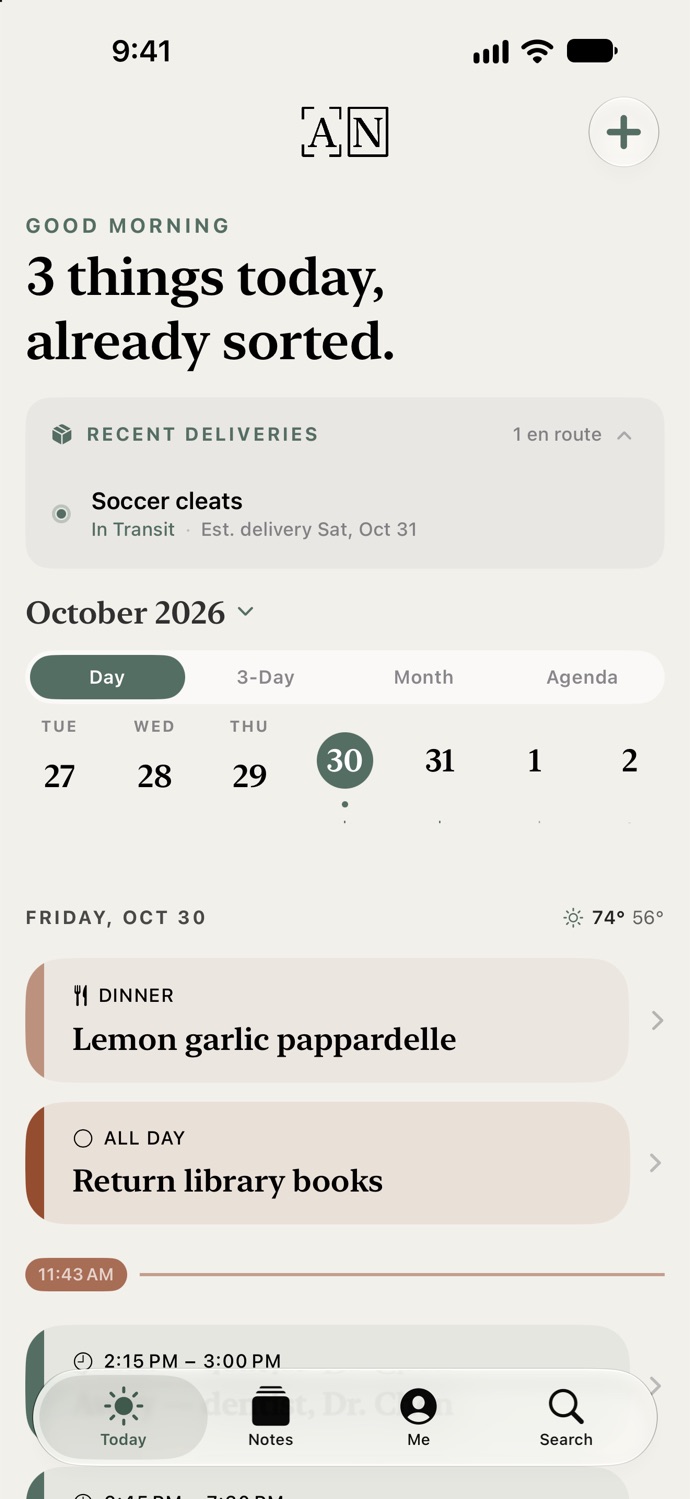
Active Notes Today on iPhone: three things today, a package on its way, and the week ahead
Coming Soon · iPhone, iPad & Mac Free on the App Store

Give it one screenshot. That’s the whole setup.

Join the waitlist and we’ll email you the moment the app goes live.

Screenshot the next school email and watch the date land on your calendar. No account, no card, no setup. Premium starts with a 7-day free trial.

Free to use at launch, across iPhone, iPad, Mac and Apple Watch.

Free to use. Your notes stay on your device until you choose otherwise.